Introduction
Picture a business owner at 9 PM, still printing shipping labels one by one while three browser tabs of carrier rate calculators sit open next to a tracking spreadsheet.
Order volume tripled this quarter. So did the hours spent chasing quotes and answering "where's my order" emails.
Manual shipping doesn't scale. Calling carriers for freight quotes can eat up to 30 minutes per shipment, according to FreightPOP's buying guide — time that adds up fast once volume climbs.
This guide breaks down what shipping and fulfillment automation actually means, why it matters for growing businesses, what tasks you can automate first, and how freight-specific automation through a TMS fits into the picture.
Key Takeaways
- Automation replaces manual order entry, labeling, and carrier calls with software workflows
- Smarter carrier and rate selection cuts costs beyond just saving labor hours
- Small and mid-sized shippers now access enterprise-grade tools once reserved for Fortune 500s
- A phased rollout beats trying to automate every process on day one
What Is Shipping and Fulfillment Automation?
Shipping automation uses software to handle carrier selection, rate comparison, label generation, and tracking updates without someone manually keying in each step. In short, it replaces manual, repetitive shipping decisions with rules the software executes automatically.
Fulfillment automation operates a layer earlier, on the warehouse side. It covers:
- Triggers picking and packing the moment an order comes in
- Updates inventory in real time as items leave the shelf
- Sends reorder alerts when stock hits a set threshold
Both systems work together. An order gets automated pick-and-pack treatment through fulfillment automation, then automated carrier selection and labeling through shipping automation, often without a human touching either step.
Manual vs. Automated Shipping: A Quick Comparison
The difference becomes obvious once you line the two up side by side.
| Task | Manual Process | Automated Process |
|---|---|---|
| Rate comparison | Call or check each carrier separately | Rules-based rate shopping in seconds |
| Label printing | One at a time, manual entry | Batch printing, auto-populated fields |
| Customer updates | Manual tracking emails | Auto-notifications triggered by status |
| Carrier choice | Default to one relationship | System selects lowest-cost/fastest option |
Underneath it all is a trigger and rule mechanism: the platform checks conditions like order value, destination, or package weight, then applies a predefined rule instead of waiting for someone to make that call manually.
Why Shipping and Fulfillment Automation Matters for Growing Businesses
Manual shipping isn't just slow. It's expensive in ways that compound as order volume grows.
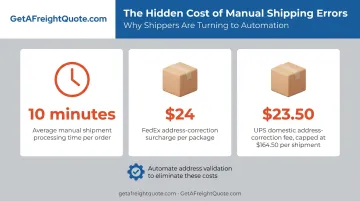
Labor cost adds up fast. FreightPOP estimates manual shipment processing and document printing alone takes about 10 minutes per shipment, on top of the time spent gathering quotes. Multiply that across dozens or hundreds of weekly orders, and the labor bill becomes real money that automation eliminates.
Errors cost more than people expect. A mislabeled package or wrong address doesn't just delay delivery; it triggers direct fees. FedEx's 2025 surcharge schedule lists a $24 address-correction charge per package, and UPS charges $23.50 domestically, capped at $164.50 per shipment. Those fees stack up quickly when manual data entry introduces mistakes.
Automation also changes how staff spend their day. Instead of:
- Re-typing addresses into carrier portals
- Calling three carriers for a rate quote
- Manually emailing customers tracking numbers
Your team focuses on sales and long-term growth planning instead. That's the work that actually moves revenue.
There's a reliability angle too. Relying on one carrier means one bad peak season or capacity crunch can stall your entire operation. Automated rate-shopping across multiple carriers builds backup options into your process, instead of scrambling to find them after a shipment gets stuck.
Beyond reliability, there's an even bigger shift: this technology isn't reserved for enterprise shippers anymore. Small and mid-sized businesses can now access rate-shopping tools and negotiated pricing that used to require Fortune 500-level volume — a genuine equalizer for anyone shipping under a few hundred packages a week.
What Can You Actually Automate? Key Areas of Shipping & Fulfillment Automation
This is the practical question most growing businesses ask first: what should I automate before anything else? Here's the breakdown by task, starting with the highest-impact areas.
Order Processing & Fulfillment Triggers
When your ecommerce or order platform connects directly to your fulfillment system, placing an order automatically triggers picking, packing, and shipping, with no manual data entry required.
One documented example: eCard Systems applied automated shipping rules and cut processing time from 30 seconds down to under 10 seconds per order, saving roughly 1.5 hours daily. That's a single case, not a universal benchmark, but it illustrates what's possible when preset rules replace manual clicking.
Carrier Selection & Freight Rate Automation
Instead of defaulting to whichever carrier you've always used, rate-shopping automation compares multiple carriers instantly at the point of shipment and selects the best cost or transit-time option.
For freight and LTL/FTL shippers, this is where a Transportation Management System (TMS) becomes essential. GetAFreightQuote.com, as an authorized reseller of a TMS platform, gives small and mid-sized businesses:
- Pre-negotiated carrier rates typically 20-50% below retail pricing
- Instant side-by-side comparison across parcel, LTL, and FTL modes
- Full rate transparency before booking, with no hidden fees or surprise invoices
- A "Bring Your Own Rates" feature that lets you add your existing UPS, FedEx, or LTL accounts and shop them against negotiated rates in the same screen
This kind of multi-carrier visibility used to require dedicated logistics staff and high shipment volume. Now it's available through registration-based access with no minimum shipping requirement.
Shipping Label Generation & Tracking Automation
Automated label generation pulls shipment details directly from your order system, cutting manual entry and reducing the errors that come with retyping addresses. Paired with barcode scanning, this speeds up packing accuracy.
On the customer side, automated tracking updates fire off notifications the moment a status changes, so nobody on your team is manually drafting "your order has shipped" emails.
Inventory & Reorder Point Automation
Setting automated reorder points means your system triggers a purchase order the moment stock hits a defined threshold. This prevents two costly problems at once: stockouts that lose sales, and overstocking that ties up cash. It's the piece that connects fulfillment automation back to the broader shipping workflow — you can't ship what you don't have on the shelf.
How to Build a Shipping Automation Strategy
Trying to automate everything simultaneously usually backfires. A phased rollout works better.
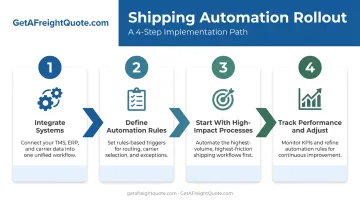
- Integrate your systems first. Connect your ecommerce or order platform with a TMS or fulfillment automation solution so orders flow through without manual re-entry between systems.
- Define your automation rules. Set clear logic for carrier selection criteria, reorder thresholds, and shipping method by order value — the system needs decision rules, not defaults.
- Start with one or two high-impact processes. Label generation and rate shopping tend to deliver the fastest, most visible wins before you expand further.
- Track performance and adjust. Monitor cost per shipment, delivery times, and error rates regularly. Carrier rates and business needs shift, so your rules should too.
Businesses testing this approach before committing can start with GetAFreightQuote.com's QuickShip tier, which carries no label fees and lets you compare live carrier rates firsthand. It's a low-risk way to validate the fit before rolling automation out further.
Common Challenges When Automating Shipping & Fulfillment
Automation isn't friction-free. Three challenges come up repeatedly:
- Upfront investment and ROI: Setup costs vary by tool and shipment volume, but most platforms pay for themselves within the first several shipments once carrier savings are factored in.
- Integration complexity: Connecting an ecommerce platform, warehouse management system, and multiple carriers isn't always plug-and-play. Choose tools built for straightforward integration, not custom development for every connection point.
- Over-automation risk: Removing human oversight entirely creates blind spots. Pair self-service technology with hands-on support so exceptions, like a damaged shipment or a carrier service disruption, still get caught.
Frequently Asked Questions
What is automation in shipping?
Shipping automation uses software to handle order processing, carrier selection, label creation, and tracking without manual work at each step. Rules built into the platform make decisions that a person previously had to make one at a time.
What can I automate to make money?
Automating carrier and rate selection, label generation, and reorder points reduces labor costs and prevents costly errors like mislabeled packages or address corrections. That protects your margins and frees up time for revenue-generating work like sales and customer outreach.
What is the difference between shipping automation and fulfillment automation?
Shipping automation focuses on carrier selection, labeling, and tracking. Fulfillment automation covers the warehouse side: picking, packing, and inventory management. Growing businesses typically need both working together.
How much does shipping automation cost for a small business?
Costs vary depending on the tool and your shipment volume, with some platforms charging no fee for low-volume shippers. Many solutions are effectively self-funded, since the carrier rate savings they unlock outweigh the platform cost within the first few shipments.
Can small businesses really access the same automation tools as large enterprises?
Yes. Platforms like GetAFreightQuote.com give smaller shippers access to enterprise-grade TMS technology and negotiated carrier rates, with no minimum shipment volume required to get started.
What is a TMS and how does it help automate freight shipping?
A Transportation Management System automates carrier selection, rate comparison, and booking for freight shippers. Instead of spending up to 30 minutes calling carriers for quotes, a TMS delivers side-by-side results in seconds.