Multi-piece shipments simplify logistics when one order is too large or fragile to fit in a single box. For domestic U.S. shipments, the main benefit is operational: one consolidated tracking record and unified paperwork. For international shipments, certain carrier services calculate rates based on the total combined weight of all packages, which can deliver real savings compared to shipping each box individually.
Key Takeaways:
- Multi-piece shipments group multiple packages to one recipient under a master tracking number, with each package receiving its own child tracking number
- Domestic U.S. multi-piece shipments are billed per package; international services may use combined-weight pricing for lower total costs
- UPS, FedEx, and DHL Express support multi-piece shipments with varying package-count capabilities and service-level restrictions
- Voiding a multi-piece shipment cancels all associated labels—individual packages cannot be voided separately in most configurations
What Is a Multi-Piece Shipment?
A multi-piece shipment is a group of two or more packages sent to the same recipient, under the same carrier service, linked by a single master identifier. Each package still receives its own unique tracking number, but all packages are grouped together for shared tracking, billing, and documentation.
Master and Child Tracking Numbers
When you create a multi-piece shipment, the carrier assigns:
- Master tracking number (or shipment ID): A single identifier that represents the entire shipment
- Child tracking numbers: Individual tracking numbers for each package within the shipment
Carrier handling differs slightly:
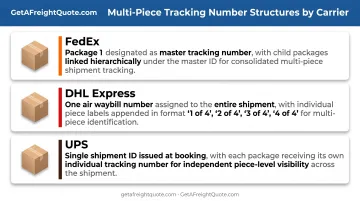
- FedEx: Package 1 is the master; later packages are children linked to that master ID
- DHL Express: One air waybill for the shipment, with piece labels marked "1 of 4," "2 of 4," and so on
- UPS: A shipment identification number plus individual package tracking numbers
Multi-Piece vs. Split Shipment
Multi-piece shipments are created at booking. All packages go to the same destination and share one consolidated tracking and documentation record.
Split shipments are different: packages release or deliver separately, often from different warehouses or at different times. Carrier multi-piece tools do not apply when packages go to different final destinations.
When to Use Multi-Piece Shipping
Multi-piece shipping makes sense when a single order exceeds the size or weight capacity of one box but all items need to reach the same recipient together.
Ideal Use Cases
Use multi-piece shipping when:
- Order size demands it: A 200-pound machinery order requires four boxes; grouping them under one shipment simplifies tracking
- Fragile items need separation: Glassware or electronics ship more safely in individual cartons but must arrive as a set
- Paperwork consolidation matters: One commercial invoice and one proof of delivery cover the entire order, reducing administrative overhead
- International cost savings apply: Certain international services rate the shipment on total combined weight, potentially lowering per-pound costs
Business scenarios that benefit:
- Large B2B orders (wholesale components, bulk supplies)
- Trade show materials (booth displays, promotional inventory)
- Furniture sets (tables, chairs, and assembly hardware as one shipment)
- Bulk inventory transfers between warehouse locations
When NOT to Use Multi-Piece Shipping
Skip multi-piece if:
- Packages can ship independently: If the customer doesn't need simultaneous arrival, separate shipments offer more flexibility
- Your carrier or service doesn't support it: USPS domestic services do not offer carrier-style master/child multi-piece configurations
- Destinations differ: Multi-piece requires identical recipient addresses for all packages
- No operational benefit exists: If you're shipping domestically and already track packages efficiently, the per-package billing means no cost reduction
Operational Benefits
Multi-piece shipping improves daily shipping workflows:
- Unified tracking: Monitor the entire order through one master number instead of searching for multiple individual tracking IDs
- Faster billing and claims: One proof of delivery and one invoice trail make AP reconciliation and loss/damage claims easier to close
- Fewer WISMO contacts: Give customers one status reference for the full order instead of piecemeal package updates
When every package in a multi-product order arrives together, customers usually stay more satisfied and return fewer items, even if transit takes a bit longer.
How Multi-Piece Billing Works
Grouping packages as multi-piece does NOT automatically reduce shipping costs. Savings depend entirely on the carrier, service level, and destination.
Domestic U.S. Billing
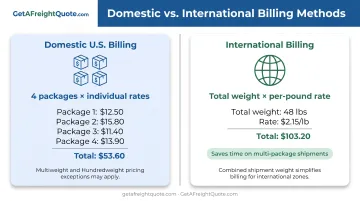
Default rule: Carriers bill each package individually, even when grouped as multi-piece.
UPS domestic: Rates apply per package for services like UPS Ground, Next Day Air, and 2nd Day Air.
The exception is UPS Hundredweight, a contractual program for two or more packages to one destination on one business day. It generally requires at least 100 pounds for eligible air services or 200 pounds for Ground.
FedEx domestic: FedEx calculates the sum of individual package charges, then compares it to FedEx Express Multiweight pricing (per-pound rate × total shipment weight). You pay whichever is lower. Qualifying thresholds:
- FedEx Express Multiweight: 100 pounds total, 15-pound average per package
- FedEx Express Saver Multiweight: 200 pounds total, same average minimum
- FedEx Ground Multiweight: Contract-only, typically 200+ pounds with contract-specific average minimums
Example (Domestic): You ship four boxes domestically via FedEx, each weighing 11 pounds (44 pounds total):
- Individual billing: 4 packages × $15 each = $60
- Multiweight (if eligible): $1.20/lb × 44 lb = $52.80
- You pay: $52.80 (the lower amount)
If your shipment doesn't meet Multiweight thresholds or you use a non-qualifying service, you pay the individual sum—$60—with no discount for grouping.
International Billing
General rule: Certain international services calculate shipping costs using the total combined weight of all packages, which can reduce per-pound rates.
UPS international: Rates are typically per shipment where shipment pricing is available. For eligible multi-piece shipments, you total the billable weight of all packages.
The U.S. rate guide does not list service eligibility explicitly. Confirm with your account manager whether UPS Worldwide Express or Worldwide Express Saver uses shipment pricing for your lane.
FedEx international (U.S. export): The 2026 rate guide publishes per-pound Multiweight tables for:
- FedEx International Economy
- FedEx International Connect Plus
- FedEx International Priority Express
- FedEx International Priority
Formula: per-pound rate × total shipment weight.
DHL Express international: The U.S. rate guide calculates chargeable weight as the higher of actual or volumetric weight per piece. U.S. documentation does not show a universal combined-weight rule for multi-piece shipments, so verify with DHL whether your service and lane support shipment-level pricing.
Example (International): Four boxes, 11 pounds each, shipped via FedEx International Priority:
- Combined weight: 44 pounds
- Per-pound Multiweight rate: $2.80/lb
- Total cost: $2.80 × 44 = $123.20
Shipping the same boxes individually might cost $35 each ($140 total), saving you $16.80 through combined-weight billing.
Key Billing Misconception
Domestically, multi-piece grouping only cuts cost when you qualify for a Multiweight or Hundredweight program. You still get unified tracking and paperwork, but billing stays per package by default.
Step-by-Step: Creating a Multi-Piece Shipment
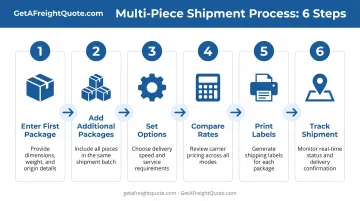
Follow this process to build and ship a multi-piece order accurately.
Before You Start
Confirm you have:
- Accurate weight and dimensions for each package: Measure and weigh every box individually
- Carrier service that supports multi-piece: UPS, FedEx, or DHL Express for most use cases
- Verified recipient address: All packages must go to the same destination
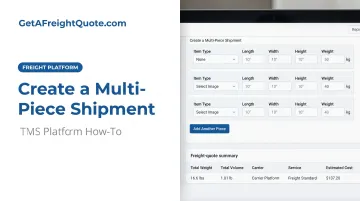
1. Enter the First Package Details
In your TMS or carrier platform:
- Select the carrier service (such as UPS Ground or FedEx International Priority)
- Choose package type (your box, carrier-provided packaging if allowed)
- Enter weight, length, width, and height for Package 1
- Add any special handling requirements (signature, Saturday delivery)
Most platforms treat Package 1 as the master package.
2. Add Additional Packages
Use the "Add Package" or "Duplicate Package" function:
- Identical packages: Duplicate the first package to auto-fill dimensions and weight
- Varying packages: Add each package individually with unique measurements
For example, if you're shipping three boxes (one 15 lb, two 10 lb), enter the 15 lb box first, then add the two 10 lb boxes separately.
3. Set Package-Specific vs. Shipment-Wide Options
Per-package settings:
- Declared value or insurance amount for each box
- Individual package references (if your workflow requires them)
Shipment-wide settings:
- Delivery confirmation method (applies to the entire order)
- Billing reference or PO number
- Shipper and recipient contact information
4. Rate Comparison and Service Selection
Your platform will display the total cost for the multi-piece shipment, calculated according to the carrier's billing rules (per package or combined weight). Compare rates across services and carriers, then select the option that balances cost and delivery speed.
If you're using GetAFreightQuote.com's TMS, you can compare live rates from multiple carriers on one screen. Connect your UPS and FedEx accounts to stack your negotiated rates against the platform's pre-negotiated pricing (typically 20–50% below retail) and pick the best available rate.
5. Print Labels
Once you confirm the shipment:
- Each package receives its own label with a unique tracking number
- The master tracking number appears on all labels for easy identification
- Print all labels and affix one to each corresponding package
Label example:
- Package 1: Master tracking
1Z999AA10123456784, child tracking1Z999AA10123456784 - Package 2: Master tracking
1Z999AA10123456784, child tracking1Z999AA10123456791 - Package 3: Master tracking
1Z999AA10123456784, child tracking1Z999AA10123456807
6. Track and Manage
Monitor the shipment using the master tracking number. Most carrier portals and TMS platforms display all child packages under one record, with delivery status for each piece. You'll receive one proof of delivery for the complete shipment once all packages arrive.
Carrier Requirements and Limitations
Not all carriers support multi-piece shipments, and those that do enforce different limits and restrictions.
| Carrier | Multi-Piece Support | Package Quantity Limits | Key Restrictions |
|---|---|---|---|
| UPS | Yes (WorldShip, API) | No universal maximum documented; up to 20 tracking numbers can be queried in one API call | UPS Returns Services do not support multi-piece; identical destination address required |
| FedEx | Yes (Ship API, Open Ship API) | API workflow limits vary (up to 200 in one-label mode, up to 300 asynchronously); Return Tag MPS allows up to 99 pieces | International Express MPS cannot mix document and commodity packages; FedEx Ground Economy requires customer packaging only |
| DHL Express | Yes (one waybill, piece labels) | MyDHL SOAP API supports up to 999 RequestedPackage nodes per request |
Product availability varies by route; confirm service-level support for your lane |
| USPS (domestic) | Not verified | Not documented | No verified master/child multi-piece model for domestic services |
Service-Level Restrictions:
- FedEx One Rate: Service guide does not confirm multi-piece compatibility—verify with FedEx before using flat-rate packaging
- Carrier-provided packaging: Some services, such as FedEx Ground Economy, ban carrier-branded boxes and require your own packaging
- Document vs. commodity: On FedEx International Express MPS, every piece must be documents or every piece commodities—never mixed
Important Note on Limits: The commonly cited figures—"UPS allows 20 packages, FedEx 100, DHL 999"—are not comparable universal maximums. UPS's 20 refers to tracking-query input limits, FedEx's workflow thresholds vary by API mode, and DHL's 999 is an API-request ceiling. Confirm operational limits with your carrier or account manager for the service and volume you actually run.
Common Mistakes to Avoid When Shipping Multi-Piece
These mistakes cause billing surprises, voided labels, and delayed pickups. Here’s what to watch for.
Assuming Domestic Multi-Piece Saves Money
The mistake: Grouping four boxes as multi-piece and expecting a discount on domestic shipping.
The reality: UPS and FedEx bill each package individually for most domestic services. Multi-piece grouping simplifies tracking and paperwork but does not reduce per-package rates unless you qualify for FedEx Multiweight (100+ lb, 15 lb average) or UPS Hundredweight (contract-based, 100–200 lb minimum).
The fix: Use multi-piece domestically for operational efficiency—unified tracking, one proof of delivery—not cost savings.
Voiding Individual Packages
The mistake: Trying to cancel one package in a four-piece shipment because the customer changed their order.
The reality: Voiding works differently by carrier:
- FedEx International Express MPS: Voiding the master tracking number deletes all child packages
- FedEx U.S. Ground MPS: You may void one package using its individual tracking number
- FedEx International Ground: Any associated tracking number voids the entire shipment
- UPS: After End of Day, voiding is allowed only if UPS has received electronic data but not taken physical possession; Hundredweight shipments can only be voided as a whole
The fix: If you need to remove one package, you'll typically need to void the entire multi-piece shipment and create a new one with the correct package count.
Selecting the Wrong Carrier Service
The mistake: Choosing a service that doesn't support multi-piece (such as certain USPS domestic options) or mixing incompatible package types (FedEx International Express documents and commodities).
The reality: Support varies by carrier, service, and lane. Some services block multi-piece entirely; others disallow mixed package types in one shipment.
The fix: Verify carrier and service-level multi-piece support before building your shipment. Confirm restrictions for your specific lane and package configuration.
Misunderstanding Package-Count Limits
The mistake: Assuming UPS caps multi-piece at 20 packages, FedEx at 100, and DHL at 999 as operational maximums.
The reality: These numbers refer to different technical contexts (API query limits, workflow thresholds, request ceilings). They are not universal shipping rules.
The fix: Check with your carrier or TMS provider for the actual package-count limits for your service and account type.
Confusing Total-Weight Entry with Billing
The mistake: Using UPS WorldShip's "Enter Total Shipment Weight" feature and believing it triggers combined-weight billing.
The reality: That feature averages the entered weight across package records for faster data entry. It does not change how UPS calculates your bill.
The fix: Understand your carrier's billing methodology (per package vs. per shipment) and confirm eligibility for any Multiweight or Hundredweight programs before assuming savings.
Frequently Asked Questions
What is a multi-piece shipment?
A multi-piece shipment is two or more packages sent to the same recipient under one master tracking number, with each package also receiving its own individual tracking number. It's used when one order is too large to fit in a single box but needs to be managed as one shipment.
Can you ship multiple packages at once?
Yes, if your carrier and service support multi-piece shipping. UPS, FedEx, and DHL Express all offer multi-piece configurations. USPS domestic services do not provide verified carrier-style master/child multi-piece functionality based on current documentation.
Is it cheaper to ship multiple packages at once?
For most domestic U.S. shipments, multi-piece grouping does not reduce costs—each package is billed on its own unless you qualify for FedEx Multiweight or UPS Hundredweight. On some international services (such as FedEx International Priority and eligible UPS Worldwide options), combined-weight billing can lower the rate by pricing the total shipment weight.
How many packages can I include in a multi-piece shipment?
Limits vary by carrier. UPS does not publish a universal multi-piece maximum; FedEx workflows typically allow 200–300 packages; DHL supports up to 999 per request. Confirm operational limits with your carrier or account manager.
What happens if I need to cancel one package in a multi-piece shipment?
In most cases, you cannot void a single package. Voiding the master (or any label, on some services) often cancels the whole shipment—FedEx U.S. Ground MPS is one of the few that may allow a single-package void. To drop one package, void the full shipment and recreate it with the correct count.
Ready to simplify multi-piece shipping? GetAFreightQuote.com's TMS lets you compare real-time rates across UPS, FedEx, and 100+ LTL and FTL carriers in one screen—including your own negotiated rates next to pre-negotiated pricing (typically 20–50% below retail).
Book, track, and manage every shipment from one dashboard, with 24/7 support from logistics experts.